Saturday, July 07, 2007

Can one be too connected?

Notice the little widget I recently added to the sidebar of this blog, down the right hand side. It's a little thingie called "Show Yourself" which allows you to place, in one convenient spot, all the various ways that people can connect to you. Some people have lists much longer than mine. Some people are connecting in all of the following ways (thanks to Lynette Radio for the image):


Some people think that being connected in so many different ways is simple overload...too much. Why have a "facebook" account when you have a "myspace" account? Why be connected on AOL Instant Messanger (AIM) when you have gChat on gMail? These are good questions. For me, it's a matter of trying them out, learning how they work, so that I can pass along my knowledge to my students. Because, in the final analaysis, I'm here to learn about all the ways to connect, so that I can help others learn what are GOOD ways to connect. And I suspect many of my over-connected friends are consultants, faculty members, and others who help others to connect.

So can one be connected too much? Sure! But being connected in lots of ways isn't necessarily too much.

Monday, June 25, 2007

Apple Technology for Diverse Learners

Here at NECC in the Exhibit Hall at the "Apple Interactive Classroom" in a session called "Apple Technology for Diverse Learners." Macintosh computers (like Windows computers) come with a variety of tools to support diverse learners, and this session provides an overview of those tools. One of the presenters works at the Chartwell School for dyslexic learners.

(Update: added the URL for the presentation as link to title of this post.)

The key phrase here is "built-in tools on the Mac," which, I suppose, is intended to stress that Mac's come with things that don't have to be purchased separately and to justify their additional cost when compared to Windows computers. These tools include iCal (when assignments are due), Dashboard (countdown timers to due dates), note-taking templates in TextEdit, and Smart Folders (virtual folders containing shortcuts to particular files and created in Finder) and Spotlight (another tool, used to find documents that may have been lost, accessible from a magnifying glass on the upper right of the Mac OS X window). These functions could be done using Outlook on a Windows machine, but of course Outlook (the full version) is an extra cost. (I wonder whether Outlook Express could be used to do these same things.)

The presenter has this phrase "Let's not do that anymore...." which is used to transition from the "old" way to do things to a "new" way to do it.

I'm distracted by the MacBook that i'm using: VERY sleek, black, comfortable, a nice piece of equipment. Apple certainly has learned about the "value" of creating a slick product.

Additional tools are the built-in dictionary with text-to-speech to get "correct" pronunciations, and a translator widget on the dashboard.

Sunday, June 24, 2007

National Educational Computing Conference

In Atlanta at the National Educational Computing Conference. I've been to this conference a number of times, presented once or twice, but mostly just kind of browsing around. It's really for practitioners (k-12) of educational technology, not so much for researchers, although there is a Teacher Education special interest group, that hosts some sessions of special interest to people like me.

This year, I'm most excited about meeting in the real world some of the people I've gotten to know in Second Life as Dewey Jung. Here's Dewey's nametag for the conference:

ISTE has a Second Life presences, and over 1000 members in Second Life. The people who will have these nametags (created by SL member Knowclue Kidd....love her avatar name) are pretty much the hardcores. At the reception tonight at the Georgia Aquarium, I'm sure there will be quite a gathering around the ISTE SL table, where we will get our nametags and meet and great each other.

So it's 3:40, and I need to get to the Marcus Auditorium for a conference intro and overview by 4:15. Into the heat.....

Tuesday, June 12, 2007

Firefox and SLURLs and Troubleshooting

Sometimes it takes a while to solve a technical problem. I just spent about 30 minutes solving a very minor but irritating problem. I thought I'd share the process and the result.

There is a simple microformat called a SLURL, or second life URL, which allows you to share a Second Life location via the Web, and have the user click to launch Second Life and open a map to teleport to that location.

A sample SLURL is http://slurl.com/secondlife/Divergent%20001/221/34/24/ (which is my student learning center in Second Life). The URL takes you to slurl.com where you can then "teleport now" into SL.

Clicking that orange button launches Second Life (if it isn't running already) and then puts a beacon on the map, allowing you to teleport to it.

The first time you click on a SLURL in Firefox, you will get a warning message that looks like this:
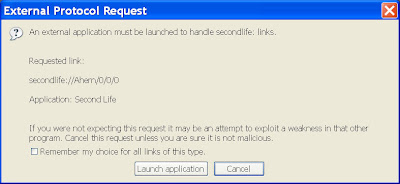
Well, if, by accident or on purpose, you don't accept the launching of Second Life when Firefox asks you, then SLURLs won't work any more. They will take you to slurl.com, but when you click on the teleport button, nothing will happen.

And, there is no obvious way to fix this, because NOTHING happens and, after looking through the Firefox options menus, I could find no way to fix it.

So, what did I do?

Go to google.

Of course. I love google. You can usually find the solution to a technical problem in a few minutes. This one took me a little longer. I searched for "slurl firefox problem" and "slurl firefox not working" and "slurl firefox" but couldn't find the solution. I tried "second life firefox" and that didn't work either. There were simply too many pages. I did discover that a SLURL is a "microformat", and learned a bit about the difference between a SLURL and a landmark, but no solution to my problem.

(I'll finish this later..... NOTE: after i posted this with the "Ill finish this later" note, a comment by Alex gave the solution. However, I also wanted to talk about the process....)

One thing I did learn was that a SLURL is somewhat different from what is known as a link with the "secondlife://" protocol prefix. Like other protocol prefixes such as http:// and ftp://, the secondlife:// prefix tells the browser how to handle a link. The secondlife:// prefix says to the browser, when you encounter this link, load secondlife.com (the Second Life client) and set the map to the location indicated in the link. So, for example, you can use the following link to go directly to my student learning center: secondlife://Divergent%20001/221/34/24.
However, that link doesn't work if you don't already have Second Life on your computer. In other words, the primary purpose of a SLURL is to deal with the situation where a person doesn't have Second Life installed on their computer. The SLURL directs the user to the slurl.com web site, which presents the screen mentioned above, with the orange "Teleport Now" button and another blue button that allows the user to get the Second Life client application.

So, the slurl http://slurl.com/secondlife/Divergent%20001/221/34/24/ uses the http:// protocol prefix to send the browser to a page at slurl.com which presents the user with the opportunity to access a link using the secondlife:// protocol prefix (through the "Teleport Now" button). The problem I had encountered earlier wasn't with the SLURL itself, but with the secondlife:// link. Firefox wasn't knowing how to handle the secondlife:// link on the "Teleport Now" button.

Knowing this new piece of information allowed me to refine my search in Google to include "secondlife:// firefox protocol". This brought up the first site on the list, Ryan Eby's blog:
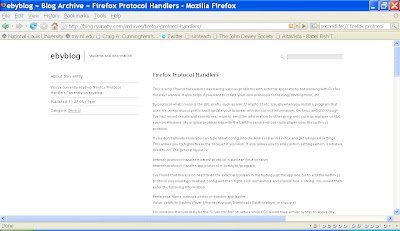
Not dealing directly with Second Life, but with protocols in Firefox, Eby writes:

"By protocol what I mean is the URL prefix such as aim:// mailto:// etc. Usually when you install a program that uses it’s own protocol prefix it will update your browser with the correct information....If you don’t already know you can type about:config into the address bar in Firefox and get advanced settings. This allows you to highly tweak the browser if you wish."

So, when you go into about:config, you can filter by secondlife and see:

network.protocol-handler.external.secondlife with a value of "false".

This is the culprit; basically "false" means Firefox doesn't allow you to use the secondlife:// protocol. So, you right-click (Apple-Click on a Mac) and choose "Reset." Then, try the "Teleport Now" link again, and a new entry is added, which is

network.protocol-handler.warn-external.secondlife with a value of "false," which means that second life is launched without a warning, which is what I wanted in the first place.

So, took a while.

Took some "collateral learning" that i hadn't expected (about protocols, and firefox).

But i solved my problem.

Which is always so satisfying, in the end, and worth the aggravation that sometimes attends the journey.

Saturday, May 05, 2007

The coming backlash against one-to-one computing

A New York Times article this week talks about some schools and school districts that have decided to discontinue one-to-one laptop initiatives in which each student is provided their own computer. While there are some questions about the quality of reporting in the article and the real issues involved in at least one district's decision to end giving out laptops (see this blog post), the article offers some cautions to those who believe (with the State of Maine and Apple) that one-to-one initiatives offer the best route to a "major transformation" of K-12 education.

The biggest issues with one-to-one initiatives seem to be the expense, the likelihood that students will use the laptops for nefarious purposes, the need for technical support, the huge professional demands of "transforming" teaching and learning, and the lack of alignment between desired learning outcomes and traditional assessments. A laptop program in one Virginia district cost an additional $1.5 million per year. These costs are sometimes shared with parents, who may resent that their children are using the computers for non-academic purposes. Some laptop programs have suffered from reliability issues with the equipment (see here), and other districts have discovered that the speed of their networks is reduced to a crawl during high-intensity use.

What's more, unless teaching and learning is fundamentally changed to incorporate the ubiquitous presence of technology, the laptops will become extraneous or worse, a distraction:
“The teachers were telling us when there’s a one-to-one relationship between the student and the laptop, the box gets in the way. It’s a distraction to the educational process,” said one district official quoted in the Times article. For example, if students are allowed to use instant messaging during class, they may pay more attention to classroom gossip and planning for the weekend events than to the academic program. Or, search engines may be used to simply find the answers to questions without any actual thinking about the question itself. Whole class or teacher-centered instruction may not employ the laptops at all.

Perhaps most significantly, ubiquitous availability of laptops--even if built into new approaches to teaching and learning--may not lead to noticable gains in student achievement.
“After seven years, there was literally no evidence it had any impact on student achievement — none,” said one school board president. Various studies have shown no increase in student grades or scores on standardized achievement tests. This becomes a huge problem for schools seeking to justify expenditures in an era of increased "accountabiility" to standards.

Of course, it can be argued that the gains supported by one-to-one computing are not easily measured through traditional means. So called "21st Century Skills" such as creativity and teamwork are not typically measured on standardized tests. Such tests tend to focus on subject-matter recall, individual performance on predefined tasks, and other "20th Century" skills, rather than higher-order thinking on open-ended problems--the most effective learning tasks using technology. (See this article on the potentialo disconnect between NCLB requirements and high use of technology.) A student who is used to using a laptop for regular school work may be disadvantaged when prohibited from using that tool during achievement tests. Student grades may not reflect increased learning because grades are typically given on a "curve" that reflect relative performance in a class rather than absolute achievement relative to a fixed standard.

While evidence of increased student learning in technology-rich environments is available, the situation exemplifies a major problem with school reform generally: the demand to redesign the vehicle while it is still traveling down the road. The need to continue to educate students while "retooling" the educational system means that it's impossible to change everything at once: teaching methods, technologies, school infrastructure and support, administrative demands, parental expectations, student habits, assessment systems, and more. So while "progress" may be made on one or more of these fronts, such progress will result in increased tensions or lowered "outcomes" in another part of the system. In a political environment that demands instant results, it is very difficult to sustain reform efforts that may actually produce lower measured achievement or create widespread confusion or dissatisfaction in the short or medium term.

One of the reasons that the American school system is so difficult to "transform" is that it is really multiple systems, with overlapping and often competing levels of governance and constituencies of stakeholders. Without a "national" vision for education (something more robust and engaging than the completely impossible goal of 100% student proficiency on standardized tests by 2014), and without true leadership on a federal level for educational transformation, we are likely to see a continued cycle of limited visions replaced by demands for "back to basics" approaches for a long time to come. This reality--and the commitment to at least try to break that cycle--may be why Bill Gates and Eli Broad
plan to make education a central issue in the 2008 presidential campaign. Their contention is that even though "Education is primarily a state and local responsibility..., this is an American problem that affects us all." My own view is that it is time for an amendment to the US constitution making education a federal responsibility, and for our politicians to get behind the depoliticization of educational reform through creation of a robust and independent educational authority at the federal level. (See the Lonang Commentaries for a radically different view on this issue.)

Real systematic reform--perhaps even a national decision not only to redesign the vehicle but perhaps even to choose a new road--is necessary to overcome the cycle of "transformation" and "back to basics" backlash that will otherwise continue to plague the arena of education, and specifically the technology of education.